
For new and seasoned painters

Any color you want, on your palette in minutes.

A paint color mixer for every painter. Pick a color or snap a photo, and Chromilla tells you which paints to mix and how much of each, so it looks right once it dries.

See why Chromilla works
Pick a color to mix
Paints to mix
  • Cadmium Red6 parts
  • Titanium Whitea touch
  • Ultramarine Bluea touch

10 of 10 free mixes left

See the full recipe →

The mix is step one.

Follow one painting from photo to palette.

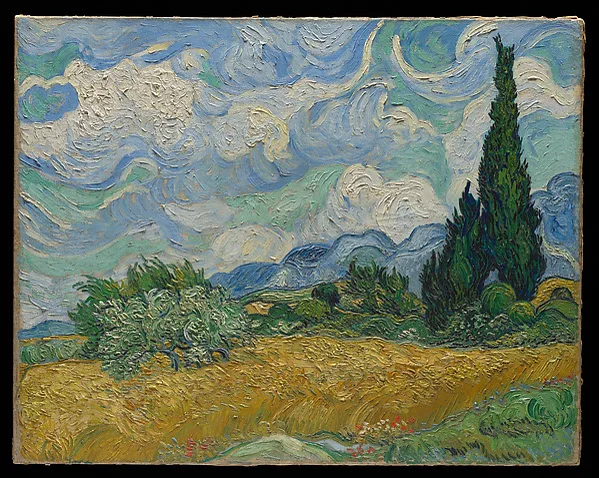
Example: Wheat Field with Cypresses, Vincent van Gogh, 1889. The Met, public domain.
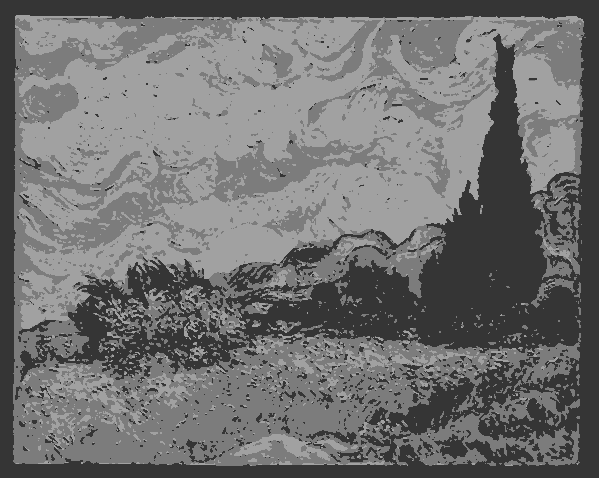
  1. Wheat Field with Cypresses reduced to three values: light, middle and dark3 values
    1See the lights and darks
    Your photo, simplified into three values, so you know what to paint where.Open Value Study →
  2. Wheat Field with Cypresses with painting-order pins on sky, distant hills, cypresses and wheat12341 Sky · 2 Hills · 3 Cypresses · 4 Wheat
    2Know what to paint first
    A step-by-step plan, with the order and a mix for each part.Start a Guided Session →
  3. Close view of the wheat field used as the recipe target
    Burnt Sienna3 parts
    Titanium White2 parts
    Ultramarine Blue1 part
    88% match when dry
    3Get every color right
    Which paints to use, and how much of each, aimed at how it dries.Try the mixer →
  4. 4Fix the last bitPro
    Snap your swatch next to the target and see what to add.See Mix Correction →

Match any paint color

Pick a color, get the exact mixing recipe for your paint brand.

Pick a color

target
#C4341C

10 of 10 free mixes left

Free account: see how it dries, save your mixes, 10 new colors every month.

Mixing recipe

4 paints
The color you want
#C4341C
Your mix, while wet
mix to this
#DC2D1D

This swatch shows the wet color. Match % uses the color once dry.

97%match when dry
Dries slightly darker and a touch warmer.
Your paints:

WhyCadmium Red sets the color. Cadmium Yellow shifts the hue. A touch of Ultramarine Blue nudges it. Titanium White lightens it.

How to mixStart with Cadmium Red, then add Cadmium Yellow, Titanium White, and Ultramarine Blue a little at a time, mixing and checking against your target as you go.

Check your mix against the recipe with your camera. Part of Chromilla Pro.

Was this mix right?

Mixing for a painting? Start one from your reference photo and Chromilla plans the order, with a mix for every area.

Start a painting

How the Chromilla color mixer works

  1. 01

    Pick your color

    Use the color picker, upload a photo, or point your camera at anything. If you can see it, Chromilla can match it.

  2. 02

    Choose your paint

    Acrylic, oil or watercolor, and your brand if you know it. Not sure? Leave it on any brand.

  3. 03

    Mix it

    Chromilla lists the paints and how much of each. Acrylic dries a little darker, so your wet mix may look a bit light. That is on purpose.

  4. 04

    Fix it if it's off

    Not quite right? Take a photo of your mix and Chromilla tells you which paint to add, and how much. (Pro)

Then paint the whole picture

Bring a photo you want to paint, and Chromilla helps you plan it, step by step. Tools marked Free work with a free account. The rest come with Pro.

Your paints

Set this up once

Free

Tell Chromilla which paints you own, and every mix uses only those.

Open →
Pro

Add a paint to your list by taking a photo of the tube's label.

Try Pro free for 14 days →
Pro

Paint a small sample of one paint, and Chromilla adjusts every mix to how that paint really behaves.

Try Pro free for 14 days →

1Study

Understand your photo

FreeNew

Turns your photo into simple light, middle and dark shapes, so you can see what to paint where.

Open →
FreeNew

Puts a grid over your photo, sized to your canvas, so you can copy the drawing one square at a time.

Open →
FreeNew

Save the photo you are painting from. Every tool opens on it and remembers where you left off.

Open →

2Plan

Know what to paint first

FreeNew

Turns your photo into a step-by-step painting plan, with a mix for every part. The first two steps are free.

Open →
ProNew

Print the mixes for one painting on a single card to keep by your easel.

Try Pro free for 14 days →

3Mix

Use the paints you own

FreeNew

A printable chart of the colors your own paints make when you mix them two at a time.

Open →
FreeNew

Find the same paint in another brand, or the closest match when there isn't one.

Open →

4Correct

Fix a mix and train your eye

Pro

Mix not quite right? Photograph it next to the color you want and Chromilla tells you what to add.

Try Pro free for 14 days →
FreeNew

A two-minute daily mixing game that trains your eye and shows what to change when a mix is off.

Open →
See all tools →

Paint mixing calculator

Chromilla works as a paint mixing calculator. Give it a color: a hex code, a photo, or a live camera sample. Choose your medium (acrylic, oil or watercolor) and your paint brand, and it returns which tubes to squeeze and in what ratio, aimed at the color once it has dried. With Pro, set a batch size or the area you are painting and the parts turn into ml or grams. Limit it to the tubes you own and every recipe stays inside them. See every paint mixing tool, or read how the mixing model works.

How Chromilla mixes paint

Chromilla uses subtractive Kubelka-Munk mixing on real pigment data and calibrates each recipe against the tubes from your brand. We normalize for tinting strength and dry-down per medium, so the parts you see are the parts you actually squeeze.

Painting miniatures? See how Chromilla handles discontinued miniature paints.

Read the full method

Frequently asked questions

How do I mix a clean green without it going muddy?
Use a yellow and a blue that both lean toward green, and keep red out of the mix. A bright, cool result comes from a green-shade yellow (like Hansa Yellow Light) plus a green-shade blue (like Phthalo Blue). Start at roughly 3:1 yellow to blue, then nudge blue in a little at a time. Green turns muddy when the blue carries red in it (like Ultramarine), because yellow plus blue plus red is the recipe for gray. If you only own a warm yellow and a warm blue, add a touch of white to lift the chroma back up.
Why do my mixed colors turn muddy?
Muddiness means you have unintentionally mixed all three primaries, which moves the color toward gray. Most muddy mixes happen because one of your two tubes secretly leans toward the third primary. Cadmium Red leans orange, Ultramarine leans purple, and many yellows lean warm. The fix is to pick tubes by their bias, not just their name, and to mix with two pigments where you can. A color with two pigments stays cleaner than the same color built from four.
What three paint tubes can mix the most colors?
If you are limited to three tubes, choose a magenta, a cyan-leaning blue, and a mid yellow. Magenta plus yellow gives clean oranges and reds. Cyan plus yellow gives clean greens. Magenta plus cyan gives clean violets. A true red, true blue, true yellow set looks intuitive but mixes dull secondaries, which is why printers use magenta and cyan instead.
How do I match a specific paint color using tubes I already own?
Tell Chromilla which tubes you have, then point it at the target color, and it returns the ratio that uses only those tubes. Chromilla reads a target three ways: your camera, an uploaded photo, or a pasted hex code. It then searches the pigment data for the closest mix your selected brand and tubes can actually reach. You get the tube list, the part-by-part ratio, and a swatch showing how the mix will look once it dries. You are never told to buy a tube you did not select.
Can I match a color from a photo or a hex code?
Yes. Chromilla accepts a live camera sample, an uploaded image, or a hex value like #3A7D44. For a photo, you tap the exact pixel you want to match, which avoids guessing from a whole image. For a hex code, paste it straight in, which is useful for matching a brand color or a digital reference. The output is the same in every case: tubes, ratio, and a dried-down swatch.
How do I darken a color without using black?
Darken with the complement of the color, or with a dark transparent pigment, instead of reaching for black. Black dulls chroma and often shifts the hue toward gray-green. To deepen a red, add a little of its complement (a green) or a touch of dark blue. To deepen a yellow, add a small amount of violet or raw umber rather than black. This keeps the shadow color alive instead of flat.
Why does my mixed color look different once it dries?
Most paints shift in value and chroma as they dry, which is called drydown. Acrylics commonly dry slightly darker than they look when wet. Some watercolors dry lighter and lose a little saturation. This is why a mix that looked perfect on the palette can miss the target on the surface. Chromilla shows a dried-down swatch with the recipe, so you mix to where the color lands, not where it starts.
How accurate are the mixing ratios?
The ratios are calculated from measured pigment data per brand, not from generic color theory. Each recipe targets the smallest visible difference between your mix and the target, measured as Delta E. A small Delta E means most eyes would call it a match. Chromilla is honest when a target sits outside what your selected tubes can physically reach, instead of pretending every color is mixable. If you are close but not exact, Mix Correction compares your wet swatch to the target and tells you the exact drop to add.
Does Chromilla work with my paint brand?
Chromilla uses brand-specific catalogs built from verified pigment data, so the ratios match the tubes you actually own. You select your brand, then your tubes, and recipes are generated against that exact set. It supports acrylic, oil, and watercolor, with mixing tips tuned to how each medium behaves. If your brand is not listed yet, the closest verified catalog still gives a workable starting ratio.
What is Chromilla?
Chromilla is a web-based paint color mixer that turns any color, from a photo, the camera or a hex code, into exact paint-tube ratios for acrylic, oil and watercolor, using Kubelka-Munk pigment mixing and aiming at the color after it dries. Around it sit tools for planning a painting from a photo, building and calibrating your palette, daily mixing practice, and running classes. It is built for painters who want to spend time painting, not guessing at the palette. The tagline is “Color for painters. Honest about paint,” because it tells you when a color cannot be reached as readily as when it can. No color theory knowledge is required to use it.
What else does Chromilla do besides mixing?
Chromilla started as a color mixer and still leads with it. Around the mixer are tools for the rest of the painting: Value Study and Guided Session turn a reference photo into a plan with a mix for every area, Palette Builder and Brand Converter keep recipes inside the tubes you own, Color Gym is a two-minute daily mixing drill, and Session Mode lets a teacher run a class of up to 10 painters from their phones.
Do I need to know color theory to use Chromilla?
No. Chromilla does the color theory for you and hands back a plain recipe. You pick a color, it gives you tubes and parts, you mix. The contextual tips explain the why if you want to learn, but you can ignore them and still get the mix. This makes it useful for a first-week beginner and a working professional alike.
How do I fix a color that is close but slightly off?
Use Mix Correction: lay a small wet swatch next to the target and let Chromilla compare them. It reads the gap between your swatch and the target. Then it tells you the exact tube and amount to add to close the gap. This turns nearly right into right without starting the mix over. It is the difference between guessing a correction and measuring one.
How much paint do I need to mix?
Open Scale this recipe under any recipe and switch to By area. Enter your canvas size, how thick you paint and how much of the painting is in that color, and Chromilla estimates the total with 20% extra so you do not run out. It is an estimate, so mix a little more for large areas of one color.
What if I run out of a paint color?
Tap the menu on that tube in the recipe and choose “I’m out of this.” Chromilla re-mixes the same color from your remaining tubes and shows how close the new match is when dry. If another tube would get you much closer, it names it.
Can Chromilla find the same color in another paint brand?
Yes. The free Brand Converter matches paints by their Colour Index pigment code first, so you find the same pigment in another brand. When no brand carries that pigment, it shows the closest color and warns that it will mix differently.
What is a value study?
A value study, or notan, reduces a reference photo to a few areas of light, middle and dark. Painting those big value shapes first gives a stronger structure before you think about color. The free Value Study tool splits any photo into 3 value zones, or 5 and 7 with Pro.
Can Chromilla turn a photo into a step-by-step painting plan?
Yes. Chromilla's Guided Session splits your photo into a few big areas, tells you what order to paint them in and gives an exact tube mix for each, in acrylic, oil or watercolor. The breakdown and first two steps are free.
Does it work for acrylic, oil and watercolor?
Yes. Chromilla supports acrylic, oil and watercolor, and adjusts the recipe for each medium. Watercolor accounts for dilution and dry-down lift, oil accounts for the slower binder and richer gloss, and acrylic accounts for the color shift as it dries.
Is Chromilla free to use?
10 free mixes without an account, then a free account gives you 10 new colors each calendar month, resetting on the 1st. Re-opening and re-mixing colors you have already mixed is free and does not count. Saved recipes stay readable. Chromilla Pro is unlimited, and adds Mix Correction, Area Sampler, Photo palettes and the Palette Builder. Start with a free 14-day trial (card required), then $8.99/month. Cancel any time before the trial ends and you won’t be charged.
Does it work on mobile?
Yes. Chromilla runs in any modern mobile browser and is designed for use at the easel. Point your phone’s camera at a reference, sample a color, and get the recipe instantly. No app install required.
How do I mix two paint colors to get a specific color?
Start with the dominant hue as 60 to 80% of the mix, then add the second color in 10 to 20% increments until the swatch reads the target. Adjust value last: white to lighten, the complement to darken cleanly. Chromilla returns the exact ratio for any target hex.
What colors make brown, beige or skin tones?
Brown comes from any two complementary colors: red + green, orange + blue, or yellow + purple. Beige is brown plus Titanium White. Skin tones build from Yellow Ochre + Burnt Sienna + white, shifted warmer or cooler with a touch of red or blue.
How do I make a color lighter or darker without changing the hue?
Lighten with Titanium White in 5% steps (or water for watercolor). Darken with a small amount of the color’s complement before reaching for black: black cools and dulls. If the hue shifts, re-tint with a dot of the original base pigment.
How do I mix paint to match a photo or color I see?
Photograph under neutral daylight, sample the exact pixel for the hex, then mix the recipe for that hex. Chromilla’s Color Extractor pulls hex codes from any photo and the camera sampler reads colors directly from real-world references.
What ratio do I use for custom paint colors?
Pigments vary in tinting strength by up to 20x, so 50/50 is rarely right. Start at 4:1 base to modifier and nudge in 10% steps. For tints, expect 80 to 90% white to 10 to 20% color. Chromilla’s ratios already account for each pigment’s tinting strength.
Can I mix different paint brands or finishes?
Within the same medium, yes: expect small color shifts because pigment loads differ between brands. Matte + gloss mix to roughly satin. Never combine oil and acrylic in the same wet layer. Pick your brand in Chromilla to recalibrate the recipe for your tubes.
How do I fix paint that's muddy, too dark or too bright?
Muddy: restart with two pigments plus white. Too dark: lift with Titanium White and re-tint. Too bright: knock saturation back with 1 to 3% of the complement, not black. The Mix Correction tool turns a wet sample plus the target into a one-step correction recipe.
How much of each color do I need for a liter of a custom shade?
Multiply each percentage by your target volume. For 1 L of a 70/20/10 recipe, that’s 700 ml base + 200 ml modifier + 100 ml white. Mix in batches under 1 L and combine them at the end to even out batch-to-batch variation.
More questions

More step-by-step recipes: browse all paint mixing guides.

Start mixing the colors you actually want.

Cancel any time.

Exact tube ratios for the colors painters ask about most.