
For new and seasoned painters
Any color you want, on your palette in minutes.
A paint color mixer for every painter. Pick a color or snap a photo, and Chromilla tells you which paints to mix and how much of each, so it looks right once it dries.
- Titanium White6 parts
- Ultramarine Blue3 parts
- Cadmium Red1 part
10 of 10 free mixes left
See the full recipe →The mix is step one.
Follow one painting from photo to palette.
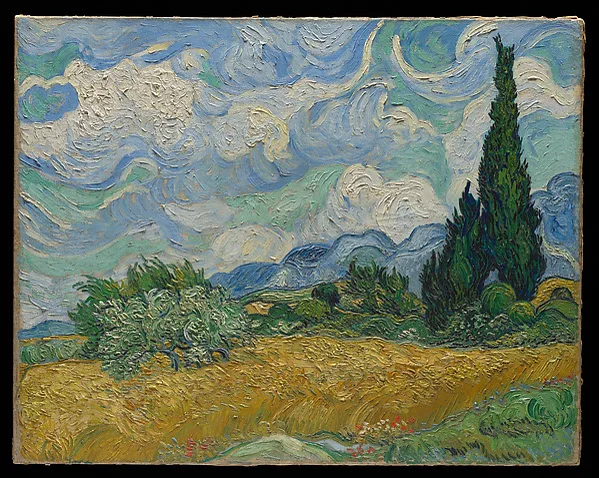
Example: Wheat Field with Cypresses, Vincent van Gogh, 1889. The Met, public domain.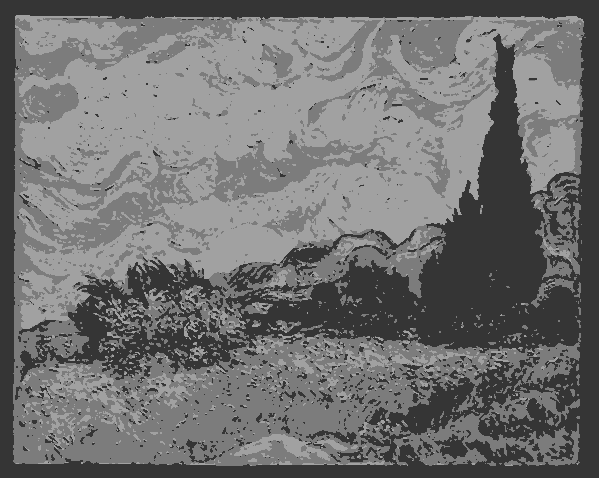 3 values1See the lights and darksYour photo, simplified into three values, so you know what to paint where.Open Value Study →
 12341 Sky · 2 Hills · 3 Cypresses · 4 Wheat2Know what to paint firstA step-by-step plan, with the order and a mix for each part.Start a Guided Session →
- 88% match when dryBurnt Sienna3 partsTitanium White2 partsUltramarine Blue1 part3Get every color rightWhich paints to use, and how much of each, aimed at how it dries.Try the mixer →
- ExampleYour swatchTargetAdd a touch more Ultramarine Blue4Fix the last bitProSnap your swatch next to the target and see what to add.See Mix Correction →
Match any paint color
Pick a color, get the exact mixing recipe for your paint brand.
Pick a color
target10 of 10 free mixes left
Free account: see how it dries, save your mixes, 10 new colors every month.
Mixing recipe
This swatch shows the wet color. Match % uses the color once dry.
Primaries can't reach this color. Add Alizarin Crimson, or switch to My palette.
How we calculate matches →WhyMostly Titanium White, so this is a light tint of a Ultramarine Blue and Cadmium Red mix.
How to mixStart with Titanium White, then add Ultramarine Blue and Cadmium Red a little at a time, mixing and checking against your target as you go.
Check your mix against the recipe with your camera. Part of Chromilla Pro.
Mixing for a painting? Start one from your reference photo and Chromilla plans the order, with a mix for every area.
Start a paintingHow the Chromilla color mixer works
- 01
Pick your color
Use the color picker, upload a photo, or point your camera at anything. If you can see it, Chromilla can match it.
- 02
Choose your paint
Acrylic, oil or watercolor, and your brand if you know it. Not sure? Leave it on any brand.
- 03
Mix it
Chromilla lists the paints and how much of each. Acrylic dries a little darker, so your wet mix may look a bit light. That is on purpose.
- 04
Fix it if it's off
Not quite right? Take a photo of your mix and Chromilla tells you which paint to add, and how much. (Pro)
Then paint the whole picture
Bring a photo you want to paint, and Chromilla helps you plan it, step by step. Tools marked Free work with a free account. The rest come with Pro.
Your paints
Set this up once
Paint a small sample of one paint, and Chromilla adjusts every mix to how that paint really behaves.
Try Pro free for 14 days →1Study
Understand your photo
Turns your photo into simple light, middle and dark shapes, so you can see what to paint where.
Open →Puts a grid over your photo, sized to your canvas, so you can copy the drawing one square at a time.
Open →Save the photo you are painting from. Every tool opens on it and remembers where you left off.
Open →2Plan
Know what to paint first
Turns your photo into a step-by-step painting plan, with a mix for every part. The first two steps are free.
Open →Print the mixes for one painting on a single card to keep by your easel.
Try Pro free for 14 days →3Mix
Use the paints you own
4Correct
Fix a mix and train your eye
Mix not quite right? Photograph it next to the color you want and Chromilla tells you what to add.
Try Pro free for 14 days →Paint mixing calculator
Chromilla works as a paint mixing calculator. Give it a color: a hex code, a photo, or a live camera sample. Choose your medium (acrylic, oil or watercolor) and your paint brand, and it returns which tubes to squeeze and in what ratio, aimed at the color once it has dried. With Pro, set a batch size or the area you are painting and the parts turn into ml or grams. Limit it to the tubes you own and every recipe stays inside them. See every paint mixing tool, or read how the mixing model works.
How Chromilla mixes paint
Chromilla uses subtractive Kubelka-Munk mixing on real pigment data and calibrates each recipe against the tubes from your brand. We normalize for tinting strength and dry-down per medium, so the parts you see are the parts you actually squeeze.
Painting miniatures? See how Chromilla handles discontinued miniature paints.
Read the full methodFrequently asked questions
How do I mix a clean green without it going muddy?
Why do my mixed colors turn muddy?
What three paint tubes can mix the most colors?
How do I match a specific paint color using tubes I already own?
Can I match a color from a photo or a hex code?
How do I darken a color without using black?
Why does my mixed color look different once it dries?
How accurate are the mixing ratios?
Does Chromilla work with my paint brand?
What is Chromilla?
What else does Chromilla do besides mixing?
Do I need to know color theory to use Chromilla?
How do I fix a color that is close but slightly off?
How much paint do I need to mix?
What if I run out of a paint color?
Can Chromilla find the same color in another paint brand?
What is a value study?
Can Chromilla turn a photo into a step-by-step painting plan?
Does it work for acrylic, oil and watercolor?
Is Chromilla free to use?
Does it work on mobile?
How do I mix two paint colors to get a specific color?
What colors make brown, beige or skin tones?
How do I make a color lighter or darker without changing the hue?
How do I mix paint to match a photo or color I see?
What ratio do I use for custom paint colors?
Can I mix different paint brands or finishes?
How do I fix paint that's muddy, too dark or too bright?
How much of each color do I need for a liter of a custom shade?
More step-by-step recipes: browse all paint mixing guides.
Start mixing the colors you actually want.
Cancel any time.
Popular paint mixes
Exact tube ratios for the colors painters ask about most.